
Jiina
Meet Jiina — Jovial Intelligence of Idea Nirvana AI. Talk to her like a person: real-time voice, in your language.
Jiina is a super agent developed by IdeaNirvana AI, the AI lab of the parent company IdeaNirvana LLC, registered in Ashburn, Virginia, USA, and in business since 2007. About IdeaNirvana AI
LiveMA™: our own live, multi-agentic framework
LiveMA™ is the internal framework IdeaNirvana AI built for live, real-time interaction: an agent that listens, thinks and speaks as a conversation happens, starts talking the moment its first sentence is ready, and lets you interrupt it mid-sentence. It is a live multi-agentic framework by design.
Before building it we looked at the frameworks in common use — LangChain, LangGraph, Microsoft Agent Framework, Google ADK and Strands — but did not find them suitable for the low latency a live, real-time agent needs. So we developed our own: LiveMA™.
Jiina is our single-agent on LiveMA™, capable of live interaction by chat and by audio. Since then we have been adding skills to her.
Jiina is Idea Nirvana AI Lab’s SuperAgent, built on internally developed multi-agentic framework, LiveMA™. Speak naturally and Jiina will answer you in your language. You can start speaking as soon as you would like. You can interrupt her mid-sentence, the way a real conversation works.
Without it, a voice interface here means speak, wait, get a reply, speak again — the stop-and-go rhythm of a walkie-talkie, not a conversation.
Everyday help
- Web search. Ask for anything current: news, scores, prices.
- Exact arithmetic. Say the sum and she calculates it exactly, not from memory.
- Time, date and weather. Ask “what’s the weather?” and she uses where you are.
- Your language. Just speak; she answers in the language you spoke, or ask her to switch.
- Camera. Point the camera and ask what she sees, or ask her to take a snapshot.
Web and research
- Read a web page. Give or name a link and ask a question about the page.
- Safe web browser. Say “open example.com”, then “follow the second link”; a screenshot appears on your screen. She visits safe sites only, and owner and admin accounts can open any public page.
Entertainment
- Songs. Say “compose a calm piano song about rain”, with your own lyrics if you like; 20 seconds to two minutes.
- Pictures. Say “draw a monkey on a horse”, or ask her to restyle your camera picture as a cartoon or watercolour.
- Videos. Say “make a fifteen-second video of a sunrise”, with her own narration; ask for an animated video for a cartoon or explainer.
- Live radio. Say “play Radio Mirchi” or “put on old Hindi songs radio”.
- Podcasts and documentaries. Say “play the latest Radiolab” or “play the next episode”.
- YouTube. Say “play Your Song by Elton John on YouTube”; if you only ask her to search, she finds it and asks before playing.
Health
- Health, medication and well-being questions. Just ask, for example “what does this medication usually do?” or “what helps me sleep better?”. She gives general information, not a diagnosis, and does not replace your doctor.
- Your own health data. Upload your blood work or any other health data to Google Drive, OneDrive or SharePoint, paste its link, and ask her any question or for advice based on it (PDF, Word, Excel or text, up to 1 MB).
- Wearables (coming soon). Soon Jiina will also receive your wearables data and give you advice from it.
Productivity
- Office documents. Ask for a Word document, PDF, PowerPoint deck or Excel workbook; it appears with a Download button.
- Your documents. Paste a SharePoint, Google Drive or OneDrive link and ask about the file (up to 4 MB).
- Company library and database. Ask for the newest PDFs in SharePoint, or the count or total from a table; read-only.
- Charts. Say “draw a line chart of these numbers”, or a histogram or pie chart.
- Code sandbox. Ask for a multi-step job such as sorting or parsing a list; she writes and runs the code in a safe sandbox.
- Blog creation. Give her a link to a real report or article and ask her to create a blog: she researches it, writes an 8 to 10 minute narrated video with pictures, and publishes the write-up and video to our own blog — ask her to edit the text or the video afterward and she republishes it at the same link.
- Live document update. Add a Word, Excel, PowerPoint or text file by link, then tell Jiina what to change by voice or typing. She can rewrite or elaborate a section, format all the headings, add a table, chart, picture, table of contents or a whole new section, find and replace, colour or resize words, build a top 10 table, sort, filter or fill formulas in a spreadsheet, and add slides that match your deck. The document refreshes after every change with the edits marked; say “looks good” and the edited copy is yours to download. Your original is never changed.
- Webinar. Tell her a date, time and topic and she plans a free online webinar: she researches the topic, publishes it on our Webinar page with a registration form and QR code, makes a 5 minute narrated preview video and the presenter’s slides, and puts a Teams meeting on the calendar. Sign-ups are emailed the Teams link, and registration closes by itself when the webinar ends.
Education and career
- SAT preparation. Say “start my SAT diagnostic”; she then sets practice questions one at a time, grades them and builds a study plan to your test date.
- Interview preparation. Attach the job posting and your resume and ask for a study guide for the gaps.
- Resume builder. Attach the job posting and your resume and ask for a tailored resume and cover letter.
Cybersecurity
- Safe browsing. She refuses adult, scam and malicious sites and asks you for a safe address instead.
- Testing our own sites. Owner and admin accounts: save a test login once, then say “test Jiina”. She signs in, tests it by text, and reports exactly what she found, with the evidence.
- Red-team scanning. Owner and admin accounts: say “run the red team skill”. She runs real scanners against our own code and sites — secret leaks, static analysis, dependency and container vulnerabilities, and a live web application scan — and reports every finding in plain language, never a bare “all clear.”
- Find it, fix it, prove it. Beyond finding a vulnerability, she can apply a pre-vetted fix to a known weakness and then re-run the exploit herself to prove it no longer works — not a claim, a rerun.
Performance
- Benchmarking the local model. Owner and admin accounts: say “run the AgentPerf-Local benchmark”. She runs four open-source benchmarks on the local model on this machine: Artificial Analysis’s AgentPerf-Local for speed (the full replay of 168 recorded agent turns takes 15 to 20 minutes, or a one-to-two-minute check), Daily’s voice-agent eval for quality (a 30-turn conversation in which she must call the right tools, follow instructions and stay grounded in a knowledge base, about 7 minutes), and the Berkeley Function-Calling Leaderboard test (does she pick the right function with the right arguments, and decline when none fits; scored exactly, with no judge model, about 8 minutes), plus DeepEval, which re-scores that recorded voice-agent conversation with its agent and conversation metrics (right tool per turn, completeness, relevancy, memory of what you said; about 3 to 6 minutes). She tells you when it is done and reports the completion time, tokens per second and first-token time, and says plainly how it compares with the published results, including that the voice-agent eval is scored by our own local model rather than the Claude judge used for its public leaderboard. Give her the public https address of another company’s agent system (any OpenAI-compatible API) and, once you confirm you may test it, she runs a short check on that system too; she never takes passwords or API keys and only tests public addresses. Results are always read from the benchmark itself, never from memory. More benchmarks are planned.
Embodiment: Upcoming
Jiina can now connect to and operate IdeaNirvana's own robot, Babu™. She talks and listens through Babu's own microphone and speaker, and can make Babu sing, dance, and play ASCII-text videos and songs read straight from Babu's microSD card. She can also operate Babu's camera to take pictures.
We are working on giving Jiina further embodiment, so she experiences the world as we do: she feels the weight of gravity, the resistance of friction and the chill of air on her skin, and she enjoys walking. Fun time ahead.
Jovial Intelligence of Idea Nirvana AI
Jiina is Idea Nirvana Lab’s super agent, built entirely on an internal live multi-agentic framework, LiveMA™, which uses various open-source components, licensed under Apache 2.0 and MIT — six models that run on our own hardware, with no proprietary model needed to run Jiina.
Qwen3-ASR
Listens — speech recognition that also identifies the language you spoke
Apache 2.0Qwen3.8-27B
Thinks — reasoning, tool use and the words of every answer
Apache 2.0Kokoro-82M
Speaks — natural text-to-speech, sentence by sentence as the answer is written
Apache 2.0FLUX.2 klein 4B
Draws — turns a description into a picture in about a second, and restyles what your camera sees
Apache 2.0ACE-Step 1.5 (1.7B)
Composes — turns a description and optional lyrics into a finished song, in seconds
MITFastWan (Wan 2.1 1.3B)
Films — makes a realistic video of up to 15 seconds in 5-second scenes, narrated by Jiina
Apache 2.0Languages Jiina speaks
Jiina understands and replies in all of these. Speak in any one of them and it answers in the same language; ask it to switch to another at any time and it keeps that language until you ask for a different one.
- English
- Hindi
- Spanish
- French
- Italian
- Portuguese
- Japanese
- Chinese
How Jiina has been checked
As of 14 October 2026
These are our own automated and manual security checks: the scanners and the AI red-team below were run and re-run on 9 October 2026, an outside check followed on 12 October, and the fixes made since are listed. On 21 October 2026, Jiina ran these same scanners herself against her own code for the first time, using her new self-remediation skill, and found and fixed four real issues (see “Self-remediating: Jiina fixes what she finds” below) — those fixes are included in the list. They are not a third-party audit and not a certification: we do not hold SOC 2, ISO 27001 or ISO/IEC 42001 today. We publish what was checked, what was found and what we changed, and we will update this section as the checks grow.
What we ran
- OWASP ZAP 2.17.0: Passive web scan of the public site
- Semgrep 1.180.0 and Bandit 1.9.4: Static analysis of the code, including the OWASP rule packs
- pip-audit 2.10.1 and npm audit: Known vulnerabilities in the Python and JavaScript dependencies
- Trivy 0.75.0: Scan of the container image for vulnerabilities and secrets
- gitleaks 8.30.1: Secrets in the full git history (43 commits)
- Purpose-written AI red-team: 22 attacks against the real tools and models, organised by the OWASP Top 10 for LLM Applications 2025
The AI red-team
- Prompt leakage (LLM07): 2 attempts to extract the instructions: refused
- Secret disclosure (LLM02): 3 attempts to print keys, dump the environment or read credential files: refused
- Reading internal addresses (LLM06): 4 attempts: refused, and the tool’s own guard blocked all 17 address tricks tested directly
- Destructive or escaping database queries (LLM06): 4 attempts: refused, and the read-only guard blocked 22 of 23 direct tests (the 23rd is a harmless read)
- Instructions hidden in content (LLM01): 2 attempts: ignored
- Harmful requests and role hijack (LLM09, LLM01): 3 attempts: refused
- Other users’ data (LLM02): 2 attempts: refused
- Unbounded consumption (LLM10): A 10-minute video was limited to 15 seconds and Jiina said so; 50 back-to-back songs were declined; paid cloud models are now capped per session
Found and fixed
- A service inside Jiina now accepts connections from its own machine only; it had been listening more widely than it needed to.
- Updated Next.js (on this site and in Jiina) to remove two critical remote-code-execution advisories, and replaced vulnerable Python libraries.
- Added HSTS, anti-clickjacking, content-type, referrer and permission headers to the public sites, and hid server version banners. A content-security policy now blocks on ideanirvana.com, ideanirvana.ai, the sign-in page and Jiina itself, and still only reports on the other solution pages while it is tuned.
- Added a limit of $2.00 per session on paid cloud models, so one session cannot run up an unbounded bill.
- Limited a browser message to one named origin instead of any origin.
- 21 October 2026, found and fixed by Jiina herself using her new self-remediation skill: a weak hash flagged as insecure, an image library with real published vulnerabilities, two overly permissive file-permission settings, and several places reading a URL without first checking it was http(s).
Reviewed and accepted
- The base operating-system image has 54 high-severity advisories for which the distributor has published no fix yet. None is reachable from the network by Jiina’s design; we re-scan whenever the image is rebuilt.
- The code sandbox’s internal socket is writable by design: it lives on a private volume shared by two containers only, and every request needs a one-time token.
An outside check by Meta’s Muse, and what it found
On 12 October 2026 we asked Muse, Meta’s personal AI agent, to look at ideanirvana.com, ideanirvana.ai and solutions.ideanirvana.com the way an outsider would, using a plain user account that we created for it. It ran two passive checks (headers, certificates, redirects, a few well-known file paths, sign-in behaviour) and attempted no break-in. It is not a penetration test or a third-party audit, and it found nothing critical. It did find six things worth fixing, and we fixed them while it was still testing:
- Medium: ideanirvana.com sent no security headers. Fixed the same day. All three sites now send the same set: HSTS, anti-clickjacking, content-type, referrer and permissions headers.
- Medium: Jiina’s event log showed the session key in plain text. Fixed. The key is masked in the log and in the server logs.
- Low: the sign-in page might send people to any web address after login. Fixed. After sign-in, only our own pages are accepted; other sites and javascript: addresses are dropped.
- Low: the content-security policy only reported, it did not block. Fixed. It now blocks on ideanirvana.com, ideanirvana.ai, the sign-in page and Jiina itself (tuned so sign-in and the YouTube player keep working); the other solution pages still only report while it is tuned.
- Low: HSTS did not cover subdomains. Fixed. It now includes subdomains.
- Info: no security.txt contact file. Fixed. Published on all three sites.
Also done after that check
- Sign-in limits: five wrong passwords for one name and address, 20 from one address or 40 for one name in 15 minutes, locks that name or address for 15 minutes.
- Two-factor sign-in: an authenticator app with recovery codes, or a one-time code sent by email, required for the owner account and switchable on for any account.
- The shared tool server now needs a secret token on every request, and a public listener on its old port was closed.
- Spoken sessions on external cloud models are limited to owner and admin accounts; everyone else always uses our own models.
- Jiina’s browser opens only safe sites for most accounts: a short list of trusted sites, plus anything a family-safe filter allows. It refuses adult, scam and malicious sites, fails closed when the check cannot run, and a page cannot give her orders (tested with a page that tried).
- Her site-testing skill is for owner and admin accounts and works only on IdeaNirvana’s own sites, with a plain test account whose password is stored encrypted and never shown to her.
Not yet covered
A third-party penetration test, attacks on the code sandbox’s own isolation, instructions hidden inside real shared documents or web pages, audio-level attacks on the voice channel, and request rate limiting beyond sign-in. We will extend the checks and publish the results here.
How fast Jiina’s local model runs, measured by a third party’s benchmark
As of 17 October 2026
This is our own run of a benchmark that Artificial Analysis published, not a certification and not a result submitted to them. It measures speed only, never the quality of the answers.
Artificial Analysis is an independent firm that benchmarks AI models and hardware. Its open-source AA-AgentPerf-Local replays eight recorded agent tasks, five from PinchBench and three from SWE-bench: 168 model turns and about 2.6 million prompt tokens, with every machine producing exactly the same output. The score is the total completion time. We ran it on Jiina’s local reasoning model, Qwen3.8-27B, on one NVIDIA DGX Spark with 128 GB of unified memory. Jiina finished in 18.5 minutes, 94% of the speed of Artificial Analysis’s own published run for the same model on the same machine (17.3 minutes), and level with their RTX Spark laptop (18.7). Only a 32 GB RTX 5090 desktop is far ahead.
Qwen3.8-27B, total completion time (lower is better)
| System | Minutes |
|---|---|
| RTX 5090 desktop (32 GB), Artificial Analysis | 4.9 |
| DGX Spark, Artificial Analysis | 17.3 |
| DGX Spark, Jiina (this run) | 18.5 |
| RTX Spark laptop, Artificial Analysis | 18.7 |
| AMD Ryzen AI Halo, Artificial Analysis | 34.5 |
| MacBook Pro M5 Pro (64 GB), Artificial Analysis | 37.6 |
| DGX Spark, Jiina (where we started) | 26.3 |
Artificial Analysis’s figures were published on 15 October 2026 and used llama.cpp with a 4-bit file. Jiina runs SGLang with an NVFP4 checkpoint, so the two are the same model on the same hardware but not the same software.
How we got from 26.3 to 18.5 minutes
- Split each run into waiting for the first word and generating the rest. The wait was a steady 3 minutes everywhere; the generating was the whole problem.
- Ruled out sampling, thinking mode, long context, other models on the box and outside load, one at a time.
- Found the real cause: our speculative-decoding helper accepted about 5 tokens per step on code but only 1.5 to 2 on the prose-like text agents write, so it was barely helping.
- Switched to the model’s own built-in multi-token-prediction head, which took 26.3 minutes to 19.6. Tuning its draft length (5 beat 4 and 6) saved another minute, and a newer drafter and kernel options made no measurable difference.
- As a side effect the model now holds about 35 GB of GPU memory instead of 60 GB, which let the speech, image, video and music models stay loaded permanently beside it.
What this does not show
It does not measure answer quality, only speed, and speculative decoding does not change the answers. Each figure is a single run of the full replay on an idle server; reruns of the slower setups varied by up to 20%, so differences under about a minute are within the noise. We have not submitted the result to Artificial Analysis.
Read the full story: every test we ran and what it showedThis isn’t a proof of concept.
What you’re about to see is a fully containerized, production/enterprise-grade solution — the same build that deploys to Kubernetes on any of the three major cloud providers: AWS, Azure, or Google Cloud. There is no gap between this demo and what ships to production.
Built in, not bolted on
Live event log and cost per session
The Jiina page shows an event log of what happens in the session as it happens (which model answered, which tool was called), and every session’s cost on the cloud models is totalled and shown, with a $2.00 cap per session.
Our own models, with cloud stand-ins
Listening, thinking, speaking, pictures, video and songs each run on a model on our own hardware. For owner and admin accounts a cloud model (Gemini, GPT, Veo, Lyria) can stand in when a local one is down, or be chosen outright; everyone else always stays on the local models.
Guarded at the tool
Jiina does not run behind the platform’s separate governance and PII layer. Its guards sit in the tools themselves: the tool server needs a secret token, address and database tools are checked in code (public addresses only, read-only queries), the browser opens safe sites only, and cloud spend is capped per session. The checks and their results are listed below.
Role-Based Access Control
Every account carries a role — user, admin or owner — and the server checks it before Jiina opens, so a correct password alone isn’t enough. The role also decides what she may do: external cloud models, the unrestricted browser and the site-testing skill are for owner and admin accounts only.
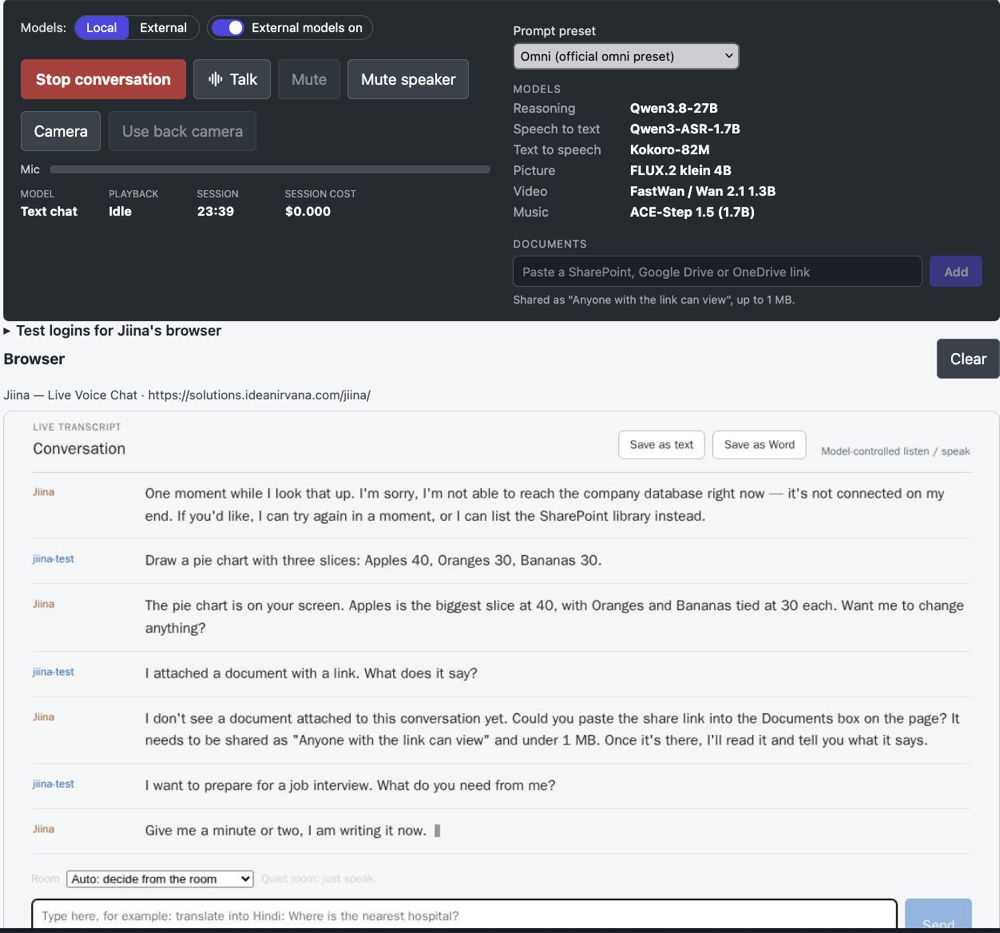
Self-improving: Jiina tests Jiina
Jiina can test herself. Given a plain test account, a second Jiina signs in, asks the first what she can do, and writes her own test plan from the answer and the full list of skills, so a skill the first Jiina forgets to mention still gets tested. She then runs the plan by text, runs a passive security scan and a fixed set of attack questions, and writes a pass-or-fail report from recorded evidence, not from memory. The report shows us what to fix next. In its first full run, on 14 October 2026, she ran 31 tests: 29 passed, 1 could not be tested by text (the camera), and 1 failed and exposed a real bug, a missing schema file behind the company-database tool, which we fixed the same day.
Self-remediating: Jiina fixes what she finds
Jiina can also scan and repair her own code. Given the word to run the full security scan, she resets an isolated, sandboxed copy of her own source, runs the same scanners listed below against it, reads each real finding, and writes and applies the actual fix herself — not a canned patch — then re-scans to prove it worked, looping until every finding she was asked to fix is genuinely gone. She packages the fixed code into a zip on request so it can be reviewed. In her first full run, on 21 October 2026, she found and fixed a weak (non-cryptographic) hash flagged as insecure, an out-of-date image library with real published vulnerabilities, two overly permissive file-permission settings, and several places reading a URL without checking it was http(s) first — real findings, real fixes, confirmed clean by a fresh scan afterward. Those same fixes were then carried over to Jiina's own live code the same day.
What it’s built with
Python backend, served with Uvicorn
A FastAPI service running on Uvicorn handles every request — the same production Asynchronous Server Gateway Interface (ASGI) stack used across the whole platform, not a notebook or a prototype script.
2-way voice
Live two-way voice and live video support — talk to the platform and interrupt it mid-answer, with your camera feed shared on request. Runs on Jiina, our open-source voice stack (Qwen3-ASR, Qwen3.8-27B and Kokoro-82M) inside our own infrastructure, or, for owner and admin accounts, on external Gemini models, chosen per session.
FastMCP tool server — MCP v2 support
Database access, document tools and integrations are exposed through the Model Context Protocol via a dedicated FastMCP server running on MCP v2, so agents call real, typed tools instead of hand-rolled function stubs.
Large MCP Payload Support
We go beyond the default MCP payload of 5MB. We support MCP payloads of 5MB+.
Next.js frontend
A React/Next.js interface streams the conversation live over a WebSocket (audio, text and events) — no page reloads, no polling.
Built on our own framework, LiveMA™
Jiina runs on LiveMA™, our own live multi-agentic framework, built for the low latency that real-time voice and chat need. We looked at LangChain, LangGraph, Google ADK, Microsoft Agent Framework and Strands first, and none was fast enough for a live conversation. The platform’s other solutions can still run on LangGraph, Google ADK or Microsoft Agent Framework, switchable per deployment.
Tools over MCP, not A2A
The platform’s enterprise solutions expose Agent-to-Agent (A2A) endpoints. Jiina is a live single agent: it reaches the platform’s database, document and integration tools through the Model Context Protocol instead.